With technology improving by the day, it is totally unimaginable the power of electronic devices that are coming out in the market these days. I was a proud owner of a bulky assembled PC just a decade ago. It costed me a bomb but had a measly 512 MB hard disk drive with 256 MB RAM, which was too good a configuration at that time that I used to wonder why would anybody want anything more than that!! I recollect how it had a bulky tower CPU and a separate CRT monitor, both so huge that it occupied a entire computer table at that time. Add to it a keyboard, there was hardly any space left on the table even to keep my hand and work! But yes, good old times, they retired!!
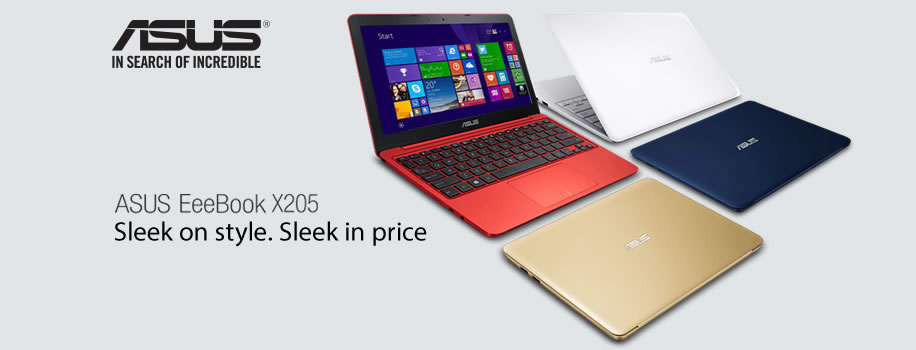
Thanks to ever evolving electronics industry, times have changed within a decade! Now we have the most powerful and sleekest of products at an affordable budget price. I happened to come across two such products today - ASUS EeeBook X205TA and the Ultra-Portable ASUS All In One PC ET2040. When I bought my Google Nexus 7 tablet from ASUS last year, I was totally impressed by the build quality of the product and the power that is packed into that small unit. From that day, I added ASUS to my watch-list for new electronic gadgets in the market! Today when I saw ASUS All In One Desktop PC ET2040 product listing in the Amazon's page, I knew it's time to retire my three year old PC finally!!
Being a freelance travel photo/videographer, I shoot for a lot of photography assignments and individual projects. My workflow typically involves transferring GBs of images and videos into hard disk, first to process them on Photoshop before finalizing them and delivering it to my clients. Currently my PC with its 1 GB RAM totally struggles even while copying the image files and with limited hard disk capacity, I can't even copy all the files locally to edit. Then to load the Photoshop takes its own sweet time rest alone editing a bulk of them!! Of late I was looking for a good desktop alternative in the market and today when I saw the specifications of this ultra-portable desktop I am again impressed with ASUS. Apart from the obvious fact that it is very slim and does not occupy much space at all, there are many useful features that make everyday use of a desktop a pleasure but I am listing below some of my favorite features that is well suited for my lifestyle!
As a photographer, my eyes are always drawn on the display characteristics of the monitor I use. With it's crisp 19.5-inch HD widescreen display with a resolution of 1366 x 768 pixels, ET2040 scores very well for my needs to edit photographs and videos. Widescreen display is a sure boost for editing landscape format photographs and LED backlight technology is guaranteed to produce amazing brightness, contrast and colors to the photographs. I am sure it will be a treat to watch the final edited cut directly on the monitor!
With latest and greatest Intel processor (Quad Core J2900) with super-fast graphics (Intel HD), it will be effortless to run even a memory hogging editing software like Photoshop. With 2 GB RAM, I can effortlessly edit bulk of my photographs and videos at ease!
Another common problem in India is the power-cut. Nothing can be irritating like that unexpected power-cut coming your way while you are editing a photograph! All the work gone the drain completely. Thanks to the savior one hour smart backup that keeps things going even in case of a power-cut! Really really useful I say!
Next impressive thing is the availability of built-in HDMI-out port! I can now directly connect my HDTV to the PC to check out the final edited videos and watch it live! Talk about all the time consuming job of copying the edited version to a separate HDD and connecting that to the HDTV to watch the cut. Again doing modifications and repeating the same task all over again! This is such a blessing, definitely!
With the availability of super-speed USB 3.0 ports, connecting my camera or my external hard disk drive and transferring images will be such a pleasure. Don't have to make a cup of coffee and wait for the transfer to complete slowly! These USB 3.0 ports can also doubly serve the purpose of charging the smartphones and tablets. I love it when multiple things can be done at a breeze.
Last but not the least hands free entertainment is another big big plus! With advanced Hand-Gesture Recognition Software (HGRS) that uses the built-in camera to accurately interpret movements, I can zoom and rotate photos from a distance, without even touching a screen, keyboard or mouse. I say it's a big plus because while watching the final cut, it will be very quick to zoom and check specific portions of the photograph to finalize it!
By checking out all my list, this PC looks like tailor made for a serious photographer like me. But yes this is just touching the tip of the iceberg, features that are very much suitable for my needs. For more features about this desktop, click here.
Thanks to ever evolving electronics industry, times have changed within a decade! Now we have the most powerful and sleekest of products at an affordable budget price. I happened to come across two such products today - ASUS EeeBook X205TA and the Ultra-Portable ASUS All In One PC ET2040. When I bought my Google Nexus 7 tablet from ASUS last year, I was totally impressed by the build quality of the product and the power that is packed into that small unit. From that day, I added ASUS to my watch-list for new electronic gadgets in the market! Today when I saw ASUS All In One Desktop PC ET2040 product listing in the Amazon's page, I knew it's time to retire my three year old PC finally!!
Being a freelance travel photo/videographer, I shoot for a lot of photography assignments and individual projects. My workflow typically involves transferring GBs of images and videos into hard disk, first to process them on Photoshop before finalizing them and delivering it to my clients. Currently my PC with its 1 GB RAM totally struggles even while copying the image files and with limited hard disk capacity, I can't even copy all the files locally to edit. Then to load the Photoshop takes its own sweet time rest alone editing a bulk of them!! Of late I was looking for a good desktop alternative in the market and today when I saw the specifications of this ultra-portable desktop I am again impressed with ASUS. Apart from the obvious fact that it is very slim and does not occupy much space at all, there are many useful features that make everyday use of a desktop a pleasure but I am listing below some of my favorite features that is well suited for my lifestyle!
As a photographer, my eyes are always drawn on the display characteristics of the monitor I use. With it's crisp 19.5-inch HD widescreen display with a resolution of 1366 x 768 pixels, ET2040 scores very well for my needs to edit photographs and videos. Widescreen display is a sure boost for editing landscape format photographs and LED backlight technology is guaranteed to produce amazing brightness, contrast and colors to the photographs. I am sure it will be a treat to watch the final edited cut directly on the monitor!
 |
| source |
Another common problem in India is the power-cut. Nothing can be irritating like that unexpected power-cut coming your way while you are editing a photograph! All the work gone the drain completely. Thanks to the savior one hour smart backup that keeps things going even in case of a power-cut! Really really useful I say!
Next impressive thing is the availability of built-in HDMI-out port! I can now directly connect my HDTV to the PC to check out the final edited videos and watch it live! Talk about all the time consuming job of copying the edited version to a separate HDD and connecting that to the HDTV to watch the cut. Again doing modifications and repeating the same task all over again! This is such a blessing, definitely!
 |
| source |
With the availability of super-speed USB 3.0 ports, connecting my camera or my external hard disk drive and transferring images will be such a pleasure. Don't have to make a cup of coffee and wait for the transfer to complete slowly! These USB 3.0 ports can also doubly serve the purpose of charging the smartphones and tablets. I love it when multiple things can be done at a breeze.
Last but not the least hands free entertainment is another big big plus! With advanced Hand-Gesture Recognition Software (HGRS) that uses the built-in camera to accurately interpret movements, I can zoom and rotate photos from a distance, without even touching a screen, keyboard or mouse. I say it's a big plus because while watching the final cut, it will be very quick to zoom and check specific portions of the photograph to finalize it!
 |
| source |
 |
| source |